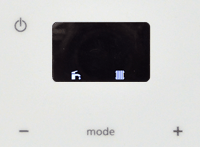
Set Appliance State:
Ensure NO demands
| WARNING! - Mains voltage is expected during test follow TOPs P4 live testing procedure |
Observation:
Reset the appliance (press and hold power button for 4 seconds then release)
The appliance will then start a self-check program which takes 1 minute.
While the self-check completes set the appliance to DHW and CH mode.
(radiator and tap symbol in display, toggle modes by pressing the "mode" button)
Once the appliance mode is set correctly the display should only show a radiator and tap symbol in the display.
If a fault code is shown at the end of the 1 minute self-check click here.
The appliance will then start a self-check program which takes 1 minute.
While the self-check completes set the appliance to DHW and CH mode.
(radiator and tap symbol in display, toggle modes by pressing the "mode" button)
Once the appliance mode is set correctly the display should only show a radiator and tap symbol in the display.
If a fault code is shown at the end of the 1 minute self-check click here.