Set Appliance State:
Access level 2 diagnostics as in the previous test.
| WARNING! - Mains voltage is expected during test follow TOPs P4 live testing procedure |
Observation:
Sometimes the software can show a fault despite the DS number being correct.
This is usually after the PCB has just been changed.
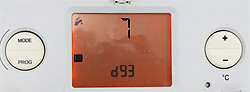
Press the mode button, the upper number should now start flashing.
Change the DS number to an incorrect number (any value except 7) by pressing the + or - buttons then press the mode button to confirm, it should return to d93 flashing.
Reset the appliance and re-enter diagnostic number 93 and return it to the correct value (set to 7).
Reset the appliance once again.
Does the appliance now enter standby or does the fault code reoccur?
This is usually after the PCB has just been changed.
Press the mode button, the upper number should now start flashing.
Change the DS number to an incorrect number (any value except 7) by pressing the + or - buttons then press the mode button to confirm, it should return to d93 flashing.
Reset the appliance and re-enter diagnostic number 93 and return it to the correct value (set to 7).
Reset the appliance once again.
Does the appliance now enter standby or does the fault code reoccur?