Set Appliance State:
Mains Power Off
Set Multimeter to DC Volts 
CH Demand
| WARNING! - Mains voltage is expected during test follow TOPs P4 live testing procedure |
Measurement:
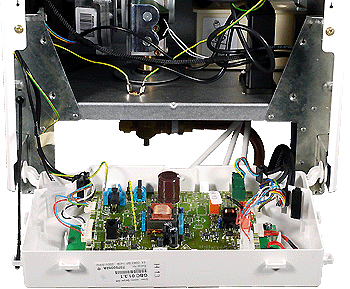
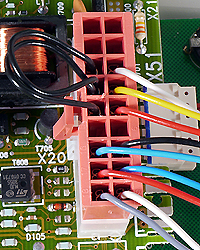
Locate the X20 connector on the PCB and test the voltage to earth on the
Yellow wire (Pin 4).
Monitor the voltage on this wire for at least 1 minute after placing a demand, you should see the voltage change as the PCB sends power to start the fan for each ignition attempt.
The table below shows the approximate voltages during normal operation:
Yellow wire (Pin 4).
Monitor the voltage on this wire for at least 1 minute after placing a demand, you should see the voltage change as the PCB sends power to start the fan for each ignition attempt.
The table below shows the approximate voltages during normal operation:
| Voltage | |
| At Rest | 7.6v |
| Demand | 10.5v |



Isolate as per TOPs P4
and refit as necessary