Set Appliance State:
Mains Power Off
| WARNING! - Mains voltage is expected during test follow TOPs P4 live testing procedure |
Observation:
Check the DSN (Device Specific Number) and
"Part Load" (similar to range rating) the boiler is set to.
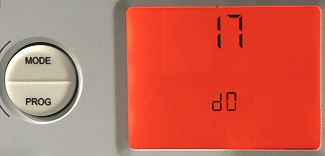
Enter the On Board Diagnostics and scroll to d.0, this is the "part load" setting for the boiler.
This is shown in KW and should be set to the boilers maximum output rating.
Now scroll to d.76 and check the DSN shown is correct for the model of boiler.
See the table below for more information.
"Part Load" (similar to range rating) the boiler is set to.
Enter the On Board Diagnostics and scroll to d.0, this is the "part load" setting for the boiler.
This is shown in KW and should be set to the boilers maximum output rating.
Now scroll to d.76 and check the DSN shown is correct for the model of boiler.
See the table below for more information.
| Appliance Model Name | DSN Code |
| Ultracom 12hxi | 3 |
| Ultracom 15hxi | 4 |
| Ultracom 18hxi | 5 |
| Ultracom 24hxi | 6 |
| Ultracom 30hxi | 7 |
| Ultracom 38hxi | 8 |